While swiping through the YouTube Shorts feed, you may find a video you love and want to download its thumbnail. But YouTube does not provide a direct option to do this. That’s why we made this tool; it allows you to download YouTube Shorts thumbnails.
How to Use
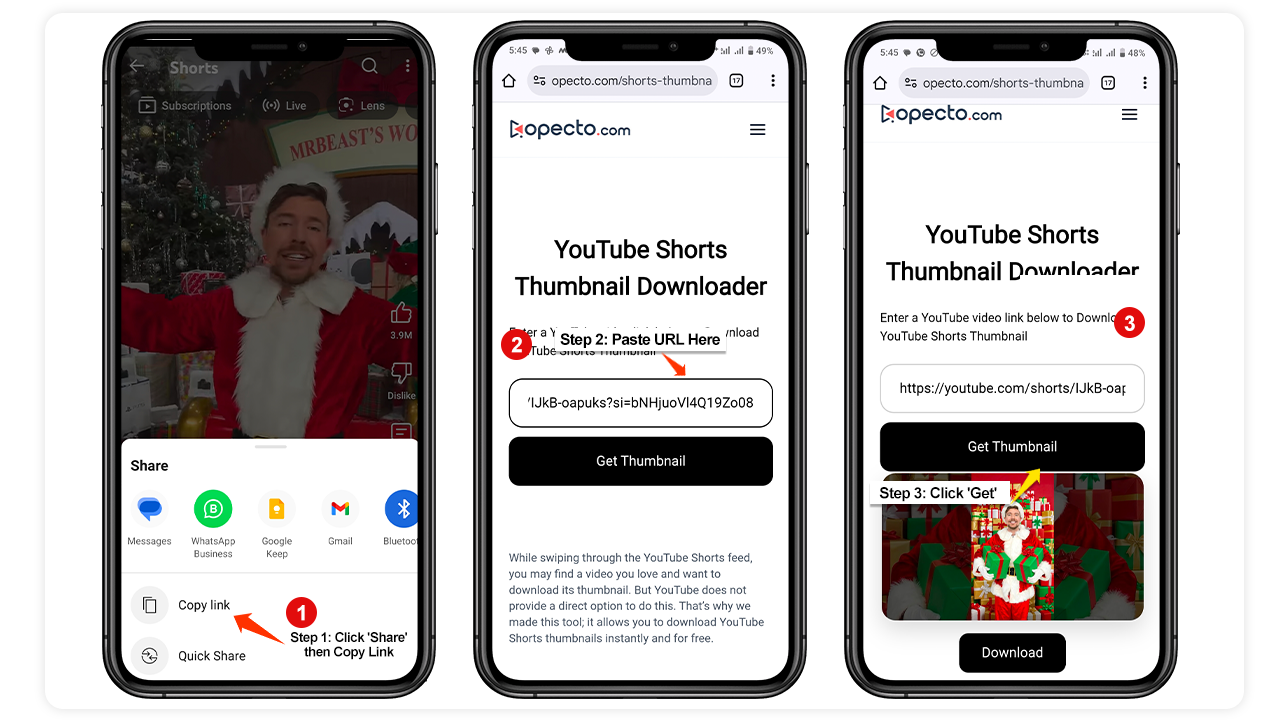
Follow these steps to download a YouTube Shorts thumbnail:
Copy the Link:
Open the YouTube app or website and copy the link of the Shorts video.
Paste the Link:
Paste the video link into the input box on this page.
Get Thumbnail & Download:
Click the "Get" button to fetch the image, then click "Download" to save the thumbnail to your device.
Frequently Asked Questions
1. Can you disable YouTube Shorts?
No, there is no official setting to disable YouTube Shorts. However, you can temporarily hide the Shorts shelf by clicking the 'X' on the desktop homepage or using browser extensions.
2. What is the maximum length of YouTube Shorts?
Initially, the limit was 60 seconds. However, as of late 2024 and throughout 2026, YouTube allows Shorts up to 180 seconds (3 minutes) in length.
3. How much can I earn if my Shorts video has 10 million views?
Earnings vary by region (RPM). For 10 million views from a Tier 3 country (like India, Pakistan, Bangladesh), you might earn $30–$70. If the views are from a Tier 1 country (like the Europe, USA, Canada, UK), you could earn between $200 and $800.
4. If I gain 100k subscribers from Shorts, will I get a Silver Play Button?
Yes. YouTube awards the Silver Creator Award once you hit 100,000 subscribers and pass their eligibility review, regardless of whether your subscribers came from Shorts or long-form videos.